- Pagina iniziale /
- Scrapbooking & Stamping Supplies /
- Die-Cutting & Embossing /
- Die-Cut Machines /
- Arts Crafts & Sewing /
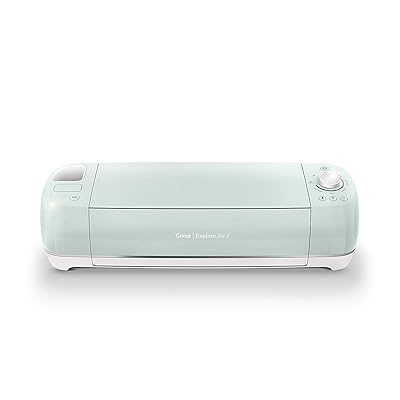
- Cricut Explore Air 2 Machine-Mint
0 ratings

Articolo #:
33797921
Cricut Explore Air 2 Machine-Mint
Articolo #:
33797921
€ 231
Price Details
Excluding Shipping & Custom charges ( Shipping and custom charges will be calculated on checkout )
*All items will import from Stati Uniti
0 ratings
Scrivi una recensione
Esaurito
 Importato dal negozio USA
Secured transaction
Ubuy works hard to protect your security and privacy. Our advanced payment security system ensures confidentiality by encrypting your information during transmission using AES (Advanced Encryption Standards) and SSL (Secure Socket Layer) protocols. Your payment details are 100% secure as we do not share your payment details with third party sellers.
I nostri principali partner logistici


Buy Now Pay Later

Consegna
veloce

Reso
gratuito*

Imballaggio sicuro

Prodotti originali al 100%

Conformità PCI DSS

Certificazione ISO 27001


Note: Step Down Voltage Transformer required for using electronics products of Stati Uniti store (110-120). Recommended power converters Acquista ora.


Cosa salta all'occhio
Versatile Cutting
Cuts over 100 materials, including vinyl, paper, and cardstock, making it perfect for a wide range of DIY projects and crafts.
Tecnología inteligente
Featuring Bluetooth connectivity, easily send designs from your devices for seamless crafting without the hassle of cords.
Design intuitivo
With an intuitive interface and fast cut speeds, this machine is perfect for both beginners and experienced crafters, simplifying the creative process.
Dettagli del prodotto
| Peso del artículo | 14 lbs (6.35 kg) |
A chi è consigliato?

-
Artesanos
Ideal for crafters who enjoy making custom designs and projects like cards, decals, and home decor.
-
Pequeñas empresas
Great for small businesses looking to create personalized products for customers efficiently and cost-effectively.
-
Aficionados del bricolaje
Perfect for DIY enthusiasts who want to explore their creativity with a versatile and user-friendly cutting machine.

-
Usuarios Pesados
Not suitable for heavy users requiring industrial-level cutting machines or continuous large volume production.
-
Principiantes
May overwhelm beginners without prior crafting experience or knowledge in design software usage and functions.
-
Compradores conscientes del presupuesto
Could be considered expensive for those looking for basic functionality without the need for advanced features.
DESCRIZIONE DEL PRODOTTO
Cricut Explore Air 2 Machine-Mint
Hai qualche domanda? chatta con noi
Domande e risposte dei clienti
-
domanda:
What can I create with the Cricut Explore Air 2 Machine-Mint?
Rispondere: The Cricut Explore Air 2 Machine-Mint is perfect for a wide range of creative projects including custom vinyl decals, personalized stationery, and intricate paper crafts. This machine is designed to cut a plethora of materials such as cardstock, vinyl, iron-on, and even specialty materials like leather or thick paper. Whether you're crafting for holidays, creating home decor, or designing custom gifts, this versatile machine empowers you to bring your imaginative designs to life with precision. -
domanda:
How does the Cricut Explore Air 2 compare to other Cricut models?
Rispondere: The Cricut Explore Air 2 stands out with its dual tool holder, enabling simultaneous writing and cutting, saving you time on projects. Compared to the original Explore model, it has enhanced cutting speeds and supports Bluetooth technology, allowing for wireless cutting from your devices. This makes it ideal for crafters who want advanced capabilities without stepping up to the more complex Cricut Maker model, making it a perfect choice for both beginners and experienced users alike. -
domanda:
Is the Cricut Explore Air 2 Machine-Mint suitable for beginners?
Rispondere: Absolutely! The Cricut Explore Air 2 Machine-Mint is designed with user-friendliness in mind, featuring an intuitive interface and a robust online design platform called Cricut Design Space. Beginners can easily navigate tutorials and guides that support their initial projects, from basic stickers to more complex designs. It’s an excellent choice for those looking to dive into crafting with step-by-step support available to ensure a smooth start. -
domanda:
What accessories do I need for using the Cricut Explore Air 2?
Rispondere: To maximize your experience with the Cricut Explore Air 2, you may consider purchasing additional tools such as replacement blades, a cutting mat, and various materials like vinyl, transfer tape, or specialty paper. These accessories enhance the machine's functionality and allow you to explore diverse crafting possibilities. Furthermore, investing in a tool set that includes weeding and scraping tools can significantly help in finishing projects with finesse. -
domanda:
Can I use the Cricut Explore Air 2 for business purposes?
Rispondere: Yes! The Cricut Explore Air 2 is an excellent option for small business owners who wish to create custom products. With its ability to cut a variety of materials and produce professional-quality designs, you can easily craft items such as personalized gifts, custom apparel, and promotional materials. The versatility of this machine caters to businesses in the crafting and small manufacturing sectors, helping you expand your product offerings. -
domanda:
Does the Cricut Explore Air 2 come with design software?
Rispondere: Yes, the Cricut Explore Air 2 includes access to Cricut Design Space, a powerful design software that allows you to create, customize, and save your projects. The platform offers a vast library of images, fonts, and ready-to-make projects, making design easy and accessible for users of all skill levels. You'll find tools for layering, resizing, and personalizing your designs, ensuring that each project is uniquely yours. -
domanda:
What is the maximum cutting size for the Cricut Explore Air 2?
Rispondere: The Cricut Explore Air 2 can cut materials up to 12 inches wide and up to 24 inches long when using specific mats. This cutting capacity allows you to create both small detailed crafts and larger projects like banners or signs. This flexibility in size is especially beneficial for those who want to tackle various craft sizes without needing multiple cutting machines. -
domanda:
Is the Cricut Explore Air 2 capable of printing and cutting?
Rispondere: Yes, the Cricut Explore Air 2 has a Print Then Cut feature that allows you to print designs using your home printer and then cut them out with precision. This is especially useful for projects that require detailed images, such as stickers or labels. Utilizing this feature opens up new avenues for creativity, enabling you to produce intricate designs that combine both printing and cutting in one seamless process. -
domanda:
Can the Cricut Explore Air 2 be used with third-party software?
Rispondere: While Cricut Design Space is the primary software recommended for the Cricut Explore Air 2, some users choose to export designs from third-party software like Adobe Illustrator or Inkscape. However, these processes may require additional steps to ensure compatibility with the machine's cutting capabilities. For users comfortable with design software, this can add a more personalized touch to your creations, especially for advanced designs. -
domanda:
Where can I buy the Cricut Explore Air 2 Machine-Mint?
Rispondere: You can buy the Cricut Explore Air 2 Machine-Mint from Ubuy. Ubuy offers a reliable online shopping experience with a vast range of products, including various crafting tools and machines like the Cricut Explore Air 2. It's a convenient platform to explore, compare, and purchase your desired craft supplies.
Cricut Arts, Crafts & Sewing Editorial Review
Nessuna recensione editoriale trovata
Recensioni e valutazioni del cliente
1 valutazioni dei clienti
-
5 stella
100%
-
4 stella
0%
-
3 stella
0%
-
2 stella
0%
-
1 stella
0%
Recensisci questo prodotto
Condividi le tue impressioni con altri clienti
Professionisti
- Versatile crafting capabilities
- Interfaccia intuitiva
- Fast cutting speed
- Wide range of materials
- Great for beginners and experts
Contro
- Requires software updates occasionally.
Cronologia dei prezzi del prodotto
Informazioni importanti
- Limitazioni: per i prodotti spediti a livello internazionale, si prega di notare che ogni garanzia del produttore potrebbe non essere valida, le opzioni di assistenza del produttore potrebbero non essere disponibili, i manuali del prodotto, le istruzioni e gli avvisi di sicurezza potrebbero non essere nella lingua del paese di destinazione. I prodotti (e i materiali di accompagnamento) potrebbero non essere progettati in conformità con gli standard, le specifiche e i requisiti di etichettatura del paese di destinazione e i prodotti potrebbero non essere conformi alla tensione di rete del paese di destinazione e ad altri standard elettrici (richiedendo l'uso di un adattatore o di un trasformatore, se necessario). Il destinatario è responsabile di assicurare che il prodotto possa essere legalmente importato nel paese di destinazione. Quando si ordina da Ubuy o dai suoi affiliati, il destinatario è l'importatore registrato ed è tenuto a rispettare tutte le leggi e i regolamenti del paese di destinazione.
- Non tutti i prodotti elencati su Ubuy sono in vendita, poiché Ubuy è un motore di ricerca globale. I prodotti sono soggetti a regolamenti di esportazione/commercio.
€ 231
Attualmente non disponibile.
Non sappiamo quando o se questo articolo sarà nuovamente disponibile.
Questo articolo non è vietato nel mio paese. (Fai clic sul link se questo articolo non è vietato nel tuo paese. In questo modo, il nostro team verificherà il permesso).
Secured transaction
Ubuy works hard to protect your security and privacy. Our advanced payment security system ensures confidentiality by encrypting your information during transmission using AES (Advanced Encryption Standards) and SSL (Secure Socket Layer) protocols. Your payment details are 100% secure as we do not share your payment details with third party sellers.
I nostri principali partner logistici
Consegna transfrontaliera più veloce