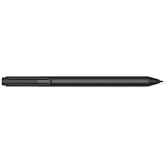
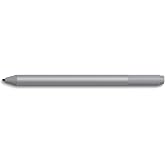
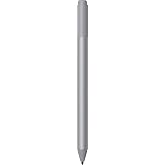
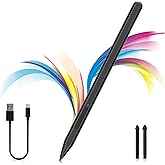
Microsoft Surface Pen for Surface 3 and Surface Pro 3 (Black)
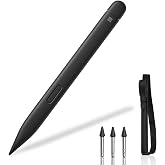
Unleash your creativity with Surface Pen. Cased in aluminum, Surface Pen looks and feels more like a fountain pen than a traditional stylus for a natural writing experience.
Microsoft Surface Pen for Surface 3 and Surface Pro 3 (Black)
Articolo #: 241410

Microsoft Surface Pen for Surface 3 and Surface Pro 3 (Black)

Articolo #: 241410

€ 61

Price Details

Excluding Shipping & Custom charges ( Shipping and custom charges will be calculated on checkout )

*All items will import from Stati Uniti

In magazzino
Stati Uniti Importato dal negozio USA

QTY:

Solo 4 articoli rimasti in magazzino.
Ordina subito e indossalo Sabato, Luglio 11
I nostri principali partner logistici
  • fedex
  • dhl
Unleash your creativity with Surface Pen. Cased in aluminum, Surface Pen looks and feels more like a fountain pen than a traditional stylus for a natural writing experience.
Garanzia U-Care:
Nessuna
Seleziona un piano
buy now pay later

Buy Now Pay Later

fast shipping

Consegna
veloce

free return

Reso
gratuito*

Imballaggio sicuro

Imballaggio sicuro

Prodotti originali al 100%

Prodotti originali al 100%

pci-dss

Conformità PCI DSS

iso certified

Certificazione ISO 27001


paypal payment
visa payment
mastercard payment
klarna payment
Note: Step Down Voltage Transformer required for using electronics products of Stati Uniti store (110-120). Recommended power converters Acquista ora.

Dettagli del prodotto

Shop Microsoft Surface Pen for Surface 3 and Surface Pro 3 (Black) online at a best price in Italia. B00VGKHPLK
  • Easy access to editing tools
  • Wireless connectivity
  • Write naturally
Numero di batterie2 AA batteries required. (included)
Dispositivos compatiblesSurface Pro 3
Descrizione della batteria碱性
Minimum Required Operating System VersionWindows 10
Compatible Tablet Computer ModelsMicrosoft Surface 3, Microsoft Surface Pro 3
Peso del artículo2.19 ounces (62.09 grams)
Dimensiones del artículo0.81 x 6.73 x 2.02 inches (2.1 x 17.1 x 5.1 cm)
ColorNegro
Material de la carcasaAluminio
MarcaMicrosoft
Número de modelo3UY-00012
Are Batteries Includedsi
¿Se requieren baterías?si
UPC885370899771
Número de Identificación del Comercio Global00885370899771
Unidad de conteo1.0 Conteo
FabricanteMicrosoft Surface Accessories - PC
Número de parte del fabricante3UY-00012
MaterialAluminio
Item dimensions L x W x H0.81 x 6.73 x 2.02 inches (2.1 x 17.1 x 5.1 cm)
Batterie richieste?si

DESCRIZIONE DEL PRODOTTO

About This Item

Introducing the Microsoft Surface Pen for Surface Pro 3 – The Perfect Tool for Creativity Unleash your creativity with the Microsoft Surface Pen. Crafted from high-quality aluminum, this stylus offers an unparalleled natural writing experience. Whether you're sketching, taking notes, or editing documents, the Surface Pen feels just like a fountain pen in your hand. Featuring over 250 levels of pressure sensitivity and Palm Block technology, this stylus allows you to write and draw without worrying about resting your hand on the screen.

You can now tell your story effortlessly, with every stroke reflecting your unique style and artistic vision. Write naturally and effortlessly with the Surface Pen. Thanks to its exceptional pressure sensitivity, you can achieve precise lines, subtle shading, and nuanced details, just like you would with a traditional pen or pencil. Get lost in your creativity and watch your ideas come to life on your Surface Pro 3. Access editing tools with ease using the convenient right-click button on the side of the pen.

Switch seamlessly between writing and erasing modes, allowing you to make changes to your notes or sketches without any interruptions. The Surface Pen is designed to enhance your productivity and streamline your editing process. Enjoy the convenience of wireless connectivity with the Surface Pen. Once you set up the Bluetooth connection with your Surface Pro 3, you can focus on creating your next masterpiece without any barriers.

Say goodbye to tangled cords and hello to a more seamless and immersive creative experience. Compatible with the Surface Pro 3 and Surface 3, the Microsoft Surface Pen is the ultimate tool for digital writing, note-taking, and drawing. Available in black, blue, red, or silver, this stylus is not only functional but also stylishly designed to complement your device. The Microsoft Surface Pen comes with a 1-year limited hardware warranty, ensuring that your investment is protected. So, what are you waiting for? Experience the freedom to create, the precision to express, and the joy of unleashing your creativity with the Microsoft Surface Pen for Surface Pro 3. Keywords: Microsoft Surface Pen for Surface Pro 3, Surface Pen for Microsoft Surface Pro 3, Surface Pro 3 Pen by Microsoft, Surface Pro 3 Pen for Microsoft Surface, Surface Pen for Surface Pro 3 by Microsoft, Microsoft Surface Pen for Surface Pro 3 tablet, Surface Pen for Microsoft Surface Pro 3 device, Surface Pro 3 Pen by Microsoft for digital writing, Surface Pro 3 Pen for Microsoft Surface tablet, Microsoft Surface Pen for Surface Pro 3 digital stylus.

Hai qualche domanda? chatta con noi

Domande e risposte dei clienti

  • domanda: What are the key features of the Microsoft Surface Pen for Surface 3 and Surface Pro 3?

    Rispondere: The Microsoft Surface Pen offers precise control with 4,096 levels of pressure sensitivity, enabling natural writing and drawing experiences. It also features tilt functionality for shading and a customizable button for quick access to features. This pen is designed for seamless integration with the Surface 3 and Surface Pro 3, making it an essential tool for artists and note-takers alike, allowing users to create detailed designs or jot down notes effortlessly.
  • domanda: How do I connect the Microsoft Surface Pen to my Surface device?

    Rispondere: Connecting the Microsoft Surface Pen is a simple process. First, ensure that the pen has a battery installed. Then, go to the Bluetooth settings on your Surface device and turn on Bluetooth. Press the button at the top of the pen until the LED indicator lights up, signaling it's in pairing mode. Your Surface device should detect the pen, allowing you to complete the pairing process. This ensures you get the best performance and features from your Surface Pen.
  • domanda: Can I use the Surface Pen on other devices besides Surface 3 and Surface Pro 3?

    Rispondere: The Microsoft Surface Pen is specifically designed for Surface 3 and Surface Pro 3, optimizing its features for these devices. While it may work with other devices that support Microsoft Pen Protocol (MPP), the full range of functionalities, such as pressure sensitivity and tilt support, may not be available. Therefore, it's recommended to use the Surface Pen with compatible Surface devices for the best experience in productivity and creativity.
  • domanda: What kind of battery does the Microsoft Surface Pen use?

    Rispondere: The Microsoft Surface Pen uses a single AAAA battery, which provides a long-lasting power source for the pen's advanced features. This type of battery allows you to use the pen for extended periods without frequent changes. Users can easily find AAAA batteries in stores or online, ensuring you can keep your pen functional for drawing and annotating on your Surface device anytime.
  • domanda: Is the Surface Pen pressure-sensitive?

    Rispondere: Yes, the Microsoft Surface Pen features 4,096 levels of pressure sensitivity, allowing for a detailed and nuanced writing or drawing experience. This sensitivity enables creators to apply varying levels of pressure to achieve different line thicknesses or shading effects, making it an ideal tool for artists, designers, and anyone looking to take digital notes in a more natural manner.
  • domanda: Can I customize the buttons on the Surface Pen?

    Rispondere: Certainly! The Surface Pen includes a customizable button that allows users to assign various functionalities, such as launching a specific app or function. This feature enhances productivity, making it easier to access tools you use most frequently without navigating through menus. For instance, you can set your pen for quick erasing or launching OneNote, tailoring your Surface experience to fit your workflow.
  • domanda: What are the best applications to use with the Surface Pen?

    Rispondere: The Surface Pen pairs well with various applications tailored for note-taking, drawing, and graphic design. Popular applications include Microsoft OneNote for note-taking, Adobe Illustrator for professional drawing, and CorelDRAW for graphic design. The versatility of the Surface Pen makes it an indispensable tool for students, illustrators, and professionals, enhancing creative processes or allowing effective information management.
  • domanda: Is the Surface Pen compatible with touchscreen applications?

    Rispondere: Yes, the Microsoft Surface Pen seamlessly integrates with touchscreen applications, providing precise interaction with various software. You can use it to navigate, select, and input information on applications designed for touch interfaces. This functionality is especially useful in educational settings, where students can annotate directly on digital resources, or for professionals who need a precise touch for editing documents or presentations.
  • domanda: How do I replace the Surface Pen battery?

    Rispondere: Replacing the battery in your Microsoft Surface Pen is straightforward. Twist off the top of the pen to access the battery compartment. Remove the old AAAA battery and insert a new one, ensuring the positive (+) end faces the pen tip. This quick battery replacement allows users to maintain seamless pen functionality, ensuring you can continue to take notes or create artworks without interruption.
  • domanda: Where can I buy the Microsoft Surface Pen for Surface 3 and Surface Pro 3 Black?

    Rispondere: You can purchase the Microsoft Surface Pen for Surface 3 and Surface Pro 3 Black from Ubuy in Italy. Ubuy offers a reliable source for tech accessories, ensuring you can easily acquire this essential tool for your Surface devices, enhancing your digital experience with optimal performance and convenience.

Microsoft Digital Pens Editorial Review

  • ubuy Italia
  • ubuy Italia

The Microsoft Surface Pen for Surface 3 and Surface Pro 3 has garnered mixed reviews from users, reflecting a blend of enthusiasm and frustration. Many users rave about the pen’s performance and ease of use, noting its premium build quality and accuracy, which enhances their experience when using the Surface devices. The ability to quickly access OneNote with a button press and the functionality of the erase button have also been highlighted as significant advantages in their daily tasks, particularly for note-taking or sketches. However, some users have voiced serious concerns regarding reliability. A recurring issue is the pen's tendency to stop working intermittently, compelling users to dismantle the pen to reconnect the battery, a frustrating experience that compromises its usability. While some reviewers appreciated the aesthetic appeal and functionality of the pen, such as using it as a mouse to reduce fingerprints on the screen, the operational flaws overshadow these positives for some customers. Overall, while the Surface Pen enhances the user experience with precise writing and convenience, issues with dependability could deter some potential buyers. Nonetheless, many still recommend it for individuals seeking a versatile tool for their Surface devices. **

Recensioni e valutazioni del cliente

4.1
113 valutazioni dei clienti
  • 5 stella
    63%
  • 4 stella
    14%
  • 3 stella
    7%
  • 2 stella
    4%
  • 1 stella
    12%

Recensisci questo prodotto

Condividi le tue impressioni con altri clienti

Professionisti

  • Excellent build quality and premium feel
  • Accurate and responsive for writing and drawing
  • Quick access to OneNote and easy-to-use erase button
  • Useful as a mouse alternative, minimizing screen fingerprints

Contro

  • InConsistent delivery of included batteries according to some users

Cronologia dei prezzi del prodotto

Informazioni importanti

  • Limitazioni: per i prodotti spediti a livello internazionale, si prega di notare che ogni garanzia del produttore potrebbe non essere valida, le opzioni di assistenza del produttore potrebbero non essere disponibili, i manuali del prodotto, le istruzioni e gli avvisi di sicurezza potrebbero non essere nella lingua del paese di destinazione. I prodotti (e i materiali di accompagnamento) potrebbero non essere progettati in conformità con gli standard, le specifiche e i requisiti di etichettatura del paese di destinazione e i prodotti potrebbero non essere conformi alla tensione di rete del paese di destinazione e ad altri standard elettrici (richiedendo l'uso di un adattatore o di un trasformatore, se necessario). Il destinatario è responsabile di assicurare che il prodotto possa essere legalmente importato nel paese di destinazione. Quando si ordina da Ubuy o dai suoi affiliati, il destinatario è l'importatore registrato ed è tenuto a rispettare tutte le leggi e i regolamenti del paese di destinazione.
  • Non tutti i prodotti elencati su Ubuy sono in vendita, poiché Ubuy è un motore di ricerca globale. I prodotti sono soggetti a regolamenti di esportazione/commercio.