- Pagina iniziale /
- Elettronica /
- Computer Accessories /
- Computer Accessories & Peripherals /
- Input Devices /
- Graphics Tablets /
- Wacom Intuos Small Graphics Drawing Tablet, I...
0 ratings


Articolo #:
220835228
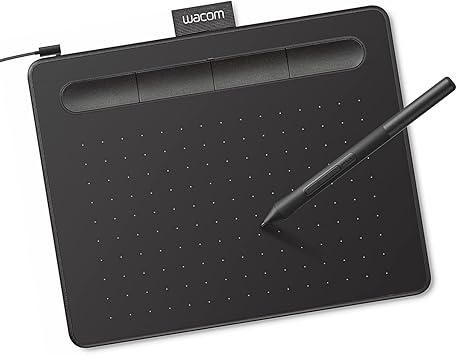
Wacom Intuos Small Graphics Drawing Tablet, Includes Training & Software; 4 Customizable ExpressKeys Compatible with Chromebook Mac Android &
Articolo #:
220835228
€ 50
Price Details
Excluding Shipping & Custom charges ( Shipping and custom charges will be calculated on checkout )
*All items will import from Stati Uniti
0 ratings
Scrivi una recensione
In magazzino
 Importato dal negozio USA
Ordina subito e indossalo Mercoledì, Luglio 01
Secured transaction
Ubuy works hard to protect your security and privacy. Our advanced payment security system ensures confidentiality by encrypting your information during transmission using AES (Advanced Encryption Standards) and SSL (Secure Socket Layer) protocols. Your payment details are 100% secure as we do not share your payment details with third party sellers.
I nostri principali partner logistici


Transform the world by bringing your vision to life with a Wacom pen in your hand.

Buy Now Pay Later

Consegna
veloce

Reso
gratuito*

Imballaggio sicuro

Prodotti originali al 100%

Conformità PCI DSS

Certificazione ISO 27001


Note: Step Down Voltage Transformer required for using electronics products of Stati Uniti store (110-120). Recommended power converters Acquista ora.


Cosa salta all'occhio
Compatibilité polyvalente
Works seamlessly across multiple platforms including Chromebook, Mac, Android, and Windows, providing flexibility for artists and designers to use their preferred devices.
Customizable ExpressKeys
Four programmable ExpressKeys offer personalized shortcuts, enhancing workflow efficiency by allowing users to access their favorite functions instantly while drawing.
Included Training & Software
Comes with comprehensive training resources and software, enabling beginners to quickly master the tablet's features and enhance their artistic skills right out of the box.
Dettagli del prodotto
A chi è consigliato?

-
Beginner Artists
Ideal for novice artists looking to start digital art without overwhelming features or complicated setups.
-
Students & Educators
Great for students and teachers needing a versatile tool for assignments, presentations, or digital teaching resources.
-
Mobile Creatives
Perfect for on-the-go creatives needing a compact, lightweight drawing solution compatible with multiple devices.

-
Professional Illustrators
May lack advanced features preferred by professional artists for intricate designs and robust performance needs.
-
3D Modelers
Not ideal for users focusing on 3D modeling, as it generally favors 2D drawing and basic design work.
-
Heavy Software Users
Limited compatibility and performance for heavy software applications may not meet the demands of experienced professionals.
DESCRIZIONE DEL PRODOTTO
Wacom Intuos Small Graphics Drawing Tablet, Includes Training & Software; 4 Customizable ExpressKeys Compatible with Chromebook Mac Android & Windows, Black
Hai qualche domanda? chatta con noi
Related Searches
Domande e risposte dei clienti
-
domanda:
What are the main features of the Wacom Intuos Small Graphics Drawing Tablet?
Rispondere: The Wacom Intuos Small Graphics Drawing Tablet boasts several impressive features, including a pressure-sensitive pen that offers 4096 levels of sensitivity, which allows for precise drawing and shading. It also includes four customizable ExpressKeys, enabling users to access frequently used functions quickly. Compatible with Chromebook, Mac, and Android devices, this tablet is versatile for artists of all skill levels. Ideal for digital artists, graphic designers, and hobbyists, the Intuos enhances creativity and workflow. -
domanda:
How do the customizable ExpressKeys enhance the user experience?
Rispondere: The four customizable ExpressKeys on the Wacom Intuos Small Graphics Drawing Tablet significantly enhance user experience by providing quick access to commonly used shortcuts. Users can program these keys to perform functions such as undo, redo, or switch tools, streamlining the creative process. This is particularly beneficial during time-sensitive projects or complex illustrations where efficiency is paramount. As a result, artists can maintain their creative flow without interruptions. -
domanda:
Is the Wacom Intuos compatible with my device?
Rispondere: Yes, the Wacom Intuos Small Graphics Drawing Tablet is compatible with a broad range of devices, including Chromebook, Mac, and Android systems. This multi-device compatibility makes it a versatile tool for digital artists, allowing them to use it with various applications. Whether drawing on a Chromebook during a lecture or using it with a Mac for a professional project, this tablet adapts to your workflow effortlessly, making it suitable for students, professionals, and casual creators alike. -
domanda:
What software is included with the Wacom Intuos tablet?
Rispondere: The Wacom Intuos Small Graphics Drawing Tablet comes with a selection of creative software to kickstart your artistic journey. This includes training resources and applications like Corel Painter Essentials and Clip Studio Paint, which cater to various artistic styles and preferences. The included software not only aids in improving skills but also provides users with tools to explore digital painting, illustration, and photo editing. These resources are perfect for beginners who are looking to learn and enhance their artistry. -
domanda:
Can I use the Wacom Intuos tablet for photo editing?
Rispondere: Absolutely! The Wacom Intuos Small Graphics Drawing Tablet is an excellent choice for photo editing. Its pressure-sensitive pen allows for fine control, enabling precise adjustments and retouching. Users can easily create masks, blend colors, and apply detailed edits, making it a favored tool among photographers and graphic designers. The intuitive interface and customizable options make it compatible with popular photo editing software, enhancing overall productivity in any editing workflow. -
domanda:
How does the pen technology work on the Wacom Intuos tablet?
Rispondere: The pen technology used in the Wacom Intuos Small Graphics Drawing Tablet is based on electromagnetic resonance, which detects the pen's pressure and tilt as you draw. This allows for a highly responsive experience, where the tablet captures every nuance of your art, from fine lines to smooth shading. This technology provides an authentic drawing experience comparable to traditional media, making it suitable for artists transitioning to digital art and enhancing their creative capabilities. -
domanda:
What type of artists benefit most from the Wacom Intuos tablet?
Rispondere: The Wacom Intuos Small Graphics Drawing Tablet is versatile, benefiting a wide range of artists. Beginners will find the included software and training valuable for developing their skills, while intermediate and advanced artists can utilize its pressure sensitivity and customization options to explore intricate designs. Illustrators, graphic designers, and hobbyists alike will appreciate its performance and adaptability across various artistic applications. Whether creating digital drawings, illustrations, or graphic art, this tablet supports diverse creative endeavors. -
domanda:
Can I use the Wacom Intuos tablet for online tutoring or collaboration?
Rispondere: Yes, the Wacom Intuos Small Graphics Drawing Tablet is an ideal tool for online tutoring or collaborative projects. Its precise drawing capabilities allow tutors to illustrate concepts live, while students can create and share their work seamlessly. This interactivity enhances remote learning experiences, making it easier for both instructors and learners to communicate ideas visually. It is especially useful for art classes, design critiques, and feedback sessions, where clarity and precision are essential. -
domanda:
What is the setup process for the Wacom Intuos tablet?
Rispondere: Setting up the Wacom Intuos Small Graphics Drawing Tablet is straightforward. First, download the necessary drivers from the Wacom website based on your operating system. Once installed, connect the tablet to your device via USB, and you're ready to go! The included software often guides you through initial setups and offers helpful tutorials. This process ensures that users of all experience levels can start creating quickly, making it an accessible option for aspiring artists. -
domanda:
Where can I buy Wacom Intuos Small Graphics Drawing Tablet?
Rispondere: You can conveniently purchase the Wacom Intuos Small Graphics Drawing Tablet at Ubuy. Ubuy offers a user-friendly shopping experience with a wide selection of tech products, including graphic tablets. Whether you're a student, professional artist, or hobbyist, Ubuy provides access to this versatile drawing tablet along with additional resources to help you on your creative journey.
Wacom Graphics Tablets Editorial Review
The Wacom Intuos Small Graphics Drawing Tablet garners a generally positive reception among users, particularly those in educational settings and casual artwork. Many users appreciate the high-quality build and performance, noting that it effectively enhances their study and tutoring experience. Students have found it especially useful for note-taking, as it allows for a seamless digital writing experience without the need for bulky devices like iPads. The tablet's responsiveness and comfort are highlighted as major positives; however, some users have reported that using it via Bluetooth can lead to decreased responsiveness and some jagged lines, which may be bothersome for those who require finer precision. In contrast, when connected via cable, users have found it to perform smoothly and reliably. The customizable ExpressKeys are also a benefit, offering flexibility for personal workflows. While users find the tablet easy to use, a few have noted that extended use can lead to discomfort, specifically pointing out that after long writing sessions, the stylus can leave marks on fingers. Additionally, initial adaptation may be required due to the hand-eye coordination involved in using the tablet, as users may need time to adjust to writing without directly looking at their hand. An aspect that has drawn criticism is the Bluetooth functionality; some users experienced difficulties in switching connections between devices, which they found cumbersome. Despite these issues, most users felt that the tablet's strengths outweighed its weaknesses, and they would recommend it to others, particularly students or casual users. **
Recensioni e valutazioni del cliente
1 valutazioni dei clienti
-
5 stella
100%
-
4 stella
0%
-
3 stella
0%
-
2 stella
0%
-
1 stella
0%
Recensisci questo prodotto
Condividi le tue impressioni con altri clienti
Professionisti
- High-quality performance for note-taking and casual drawing
- Comfortable to use with a smooth writing experience when wired
- Customizable ExpressKeys enhance workflow efficiency
- Ideal for educational purposes
Contro
- Extended use may cause discomfort in fingers
Top selling Wacom Intuos Tablet in Italy


![Wacom pen tablet Intuos Pro Medium [new model] 2017 January model PTH-660 / K0Japan Import-](https://m.media-amazon.com/images/I/51MtBAWR2nL._AC_SY355_.jpg)
Last Updated on June 22, 2026
Cronologia dei prezzi del prodotto
Informazioni importanti
- Limitazioni: per i prodotti spediti a livello internazionale, si prega di notare che ogni garanzia del produttore potrebbe non essere valida, le opzioni di assistenza del produttore potrebbero non essere disponibili, i manuali del prodotto, le istruzioni e gli avvisi di sicurezza potrebbero non essere nella lingua del paese di destinazione. I prodotti (e i materiali di accompagnamento) potrebbero non essere progettati in conformità con gli standard, le specifiche e i requisiti di etichettatura del paese di destinazione e i prodotti potrebbero non essere conformi alla tensione di rete del paese di destinazione e ad altri standard elettrici (richiedendo l'uso di un adattatore o di un trasformatore, se necessario). Il destinatario è responsabile di assicurare che il prodotto possa essere legalmente importato nel paese di destinazione. Quando si ordina da Ubuy o dai suoi affiliati, il destinatario è l'importatore registrato ed è tenuto a rispettare tutte le leggi e i regolamenti del paese di destinazione.
- Non tutti i prodotti elencati su Ubuy sono in vendita, poiché Ubuy è un motore di ricerca globale. I prodotti sono soggetti a regolamenti di esportazione/commercio.
€ 50
Ordina subito e indossalo Mercoledì, Luglio 01
Questo articolo non è vietato nel mio paese. (Fai clic sul link se questo articolo non è vietato nel tuo paese. In questo modo, il nostro team verificherà il permesso).
QTY:
Secured transaction
Ubuy works hard to protect your security and privacy. Our advanced payment security system ensures confidentiality by encrypting your information during transmission using AES (Advanced Encryption Standards) and SSL (Secure Socket Layer) protocols. Your payment details are 100% secure as we do not share your payment details with third party sellers.
I nostri principali partner logistici
Consegna transfrontaliera più veloce
Caratteristiche e benefici
- Ideal for beginners in drawing, painting, and photo editing.
- Compatible with Mac, PC, Chromebook, and select Android devices.
- Includes useful software and online tutorials for creative guidance.
- Perfect for educational settings to enhance learning and flexibility.
- Features a compact design, making it portable and space-efficient.
- Customizable ExpressKeys for personalized workflow.